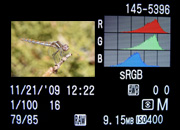
 A few weeks ago, I explained how to use the histogram to get a better exposure. And although the default histogram will give you a general idea of an image’s exposure, there’s actually a special histogram that’ll tell you a lot more: the RGB histogram.
Here’s how it works:
If you understand the regular histogram, then the RGB histogram is simple: it shows you the histogram of each individual color channel (red, green, and blue).
The bad thing about the regular histogram is that it lumps all these color channels together, making it hard for you to see if you’re underexposing or overexposing a specific color channel. And, on some cameras, I’ve heard that the regular histogram only shows you the green channel. [Read more…] about How to use the “special” RGB Histogram

 In last week’s post, I explained
  One of the first things you probably want to know after taking a photo is whether or not you got your intended exposure.
 Sometimes autofocus can be really annoying. For some shots it’ll focus on the right part of your subject, but then the very next shot it may choose to focus on something far and away into the background.